Community field research platform

Turn community fieldwork into research-grade insight.

A mobile & web platform for structured, participatory data collection — built for NGOs, researchers, and field teams. Design your study, collect offline in the field, and analyze it on maps, dashboards, and AI-assisted summaries.

2 modes
Survey + Module
5 levels
Country → Locality
10+ types
of field to capture
Offline
first, sync later
Data-entry form on the Empower mobile app: report date, time and survey questions
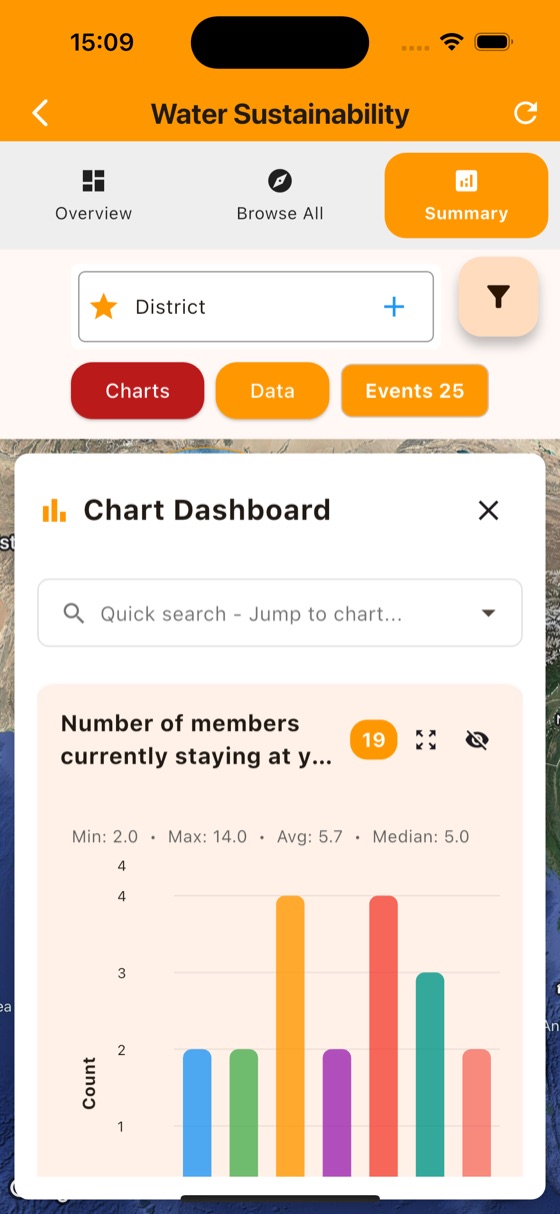
Chart dashboard on the Empower mobile app showing a bar chart with min, max, average and median
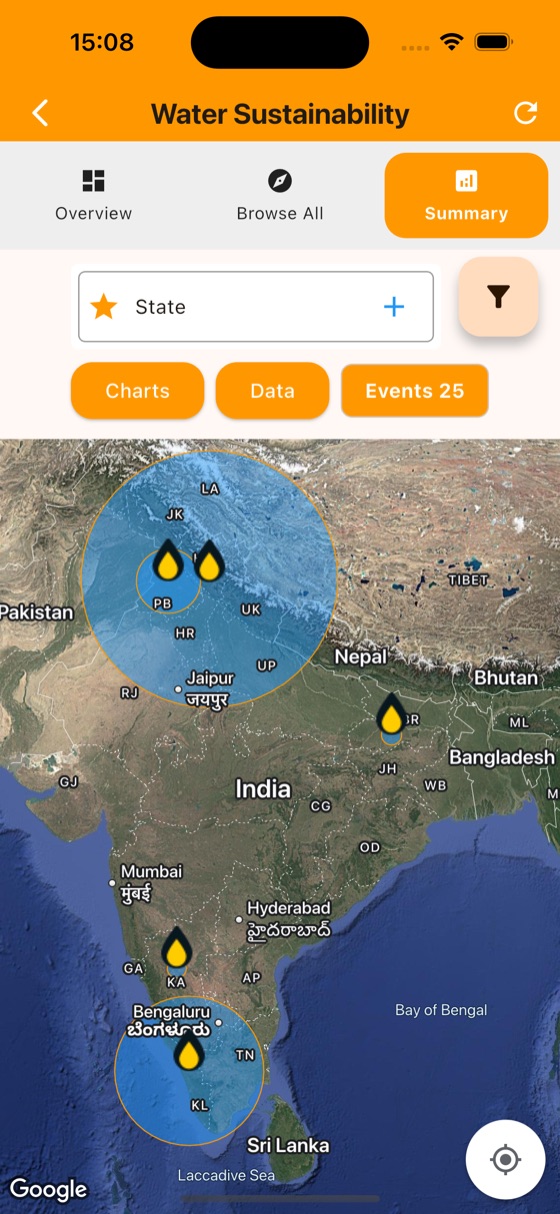
Summary map of India on the Empower mobile app with sized bubbles showing where records were collected
Works offline GPS · photos · audio Syncs when you're back online
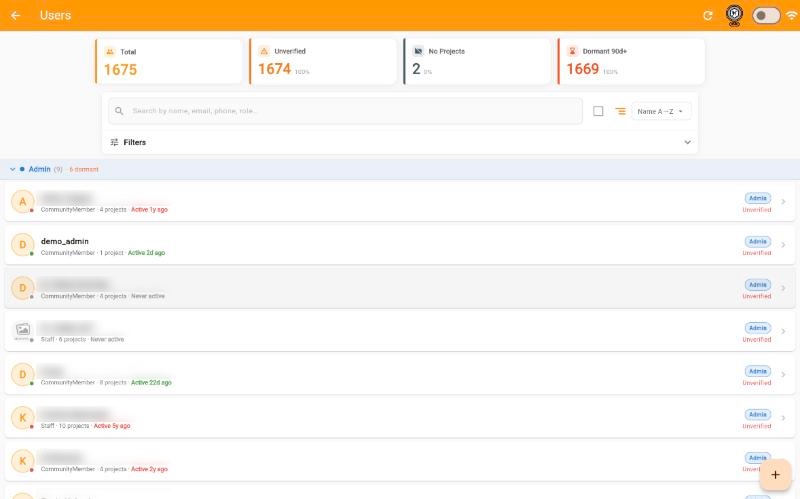
 Administration · Users
Users screen of the Empower web app with user-health cards, search, filters and roles
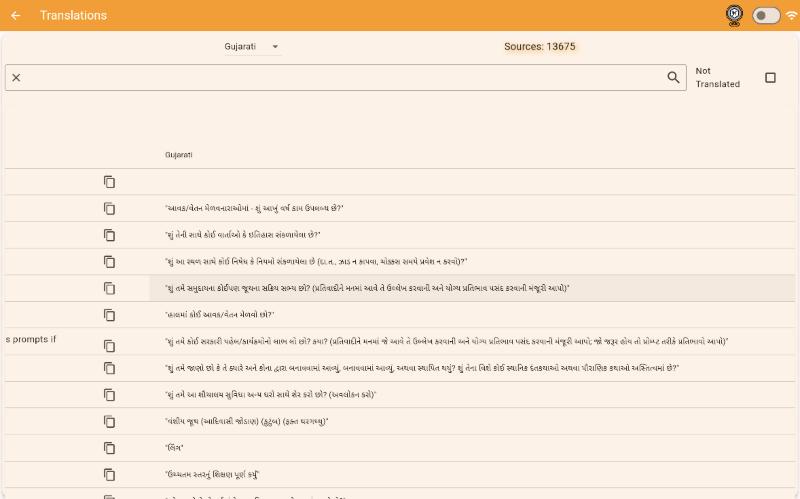
 Translations
Translations screen showing survey text translated into Gujarati
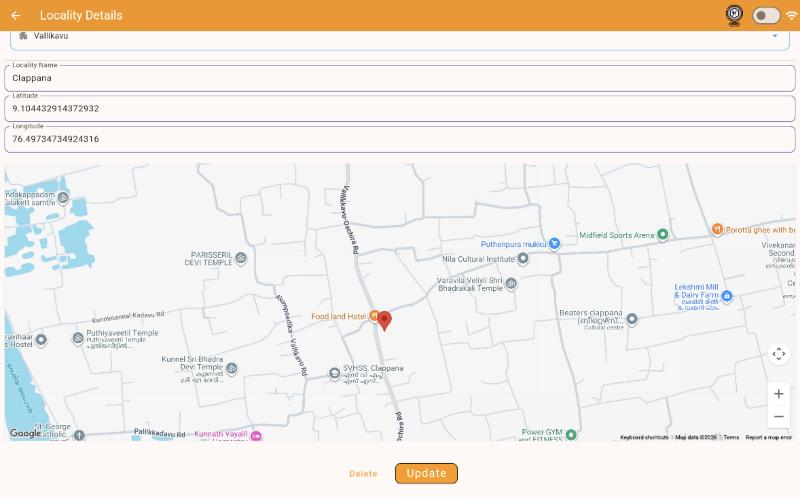
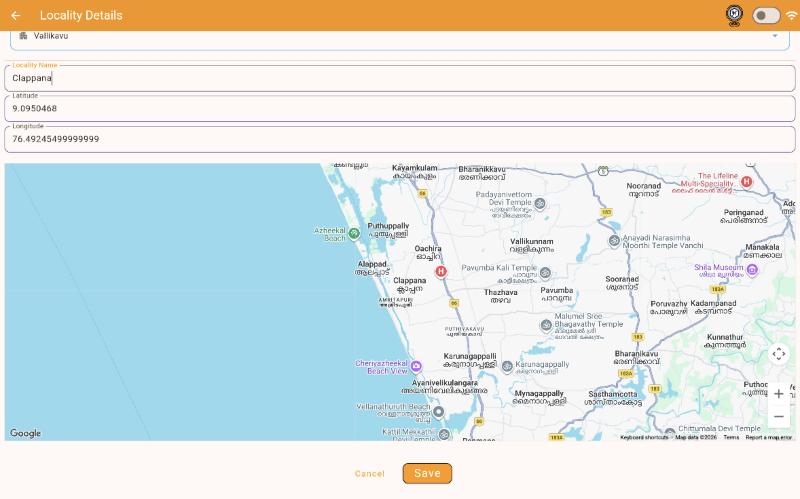
 Geo setup
Geo location setup screen with a map pin placed on a village
Roles & permissions Multi-language
Real screens from the app
Developed at Amrita Vishwa Vidyapeetham Used for participatory rural appraisal · monitoring & evaluation · academic field studies
Start here

I'm a… where do I begin?

Pick what describes you and we'll point you to the right first steps.

Design rigorous instruments, then analyse.

Capture geo-tagged and multimedia responses, then export and analyse. Consent and audit trails support ethics approval.

  1. Choosing your data-collection mode
  2. Create your first project
  3. Event summary & the summary map
Open the Analyst path
Chart dashboard on the mobile app
Two ways to collect

One platform, two modes of data collection

Use them independently or together. Switch between them to see how each one is organised.

Projects → Event Types (survey forms) → Events (surveys)

Structured, time-bound studies

Design adaptive questionnaires with conditional and recurring question flows. Collect and review responses on map, image, or list views, with built-in download, analysis, and summary dashboards.

Best forOne-off surveys · baseline studies · campaign-based data gathering
Not sure which fits?
Read: choosing your mode
Geography-aware

Collect at the village. See it at every level.

Level 1 of 5

Country

India

Start wide. Every record belongs to a country, so a multi-state programme reads as one picture.

Boundaries to district level: DataMeet, Survey of India outline (CC BY 4.0). Block and locality edges are schematic; the pin is at its real coordinates. Bubble counts are illustrative.
What it does

Everything a field study needs, in one place

From instrument design to analysis — collect rich data anywhere, then turn it into findings.

Data capture

Rich, flexible data capture

A custom question builder with 10+ field types, plus conditional and recurring flows. Design once, reuse across the whole team.

TextNumberSingle choiceMultiple choiceDateLocationImageDocumentAudioVideoLinked records
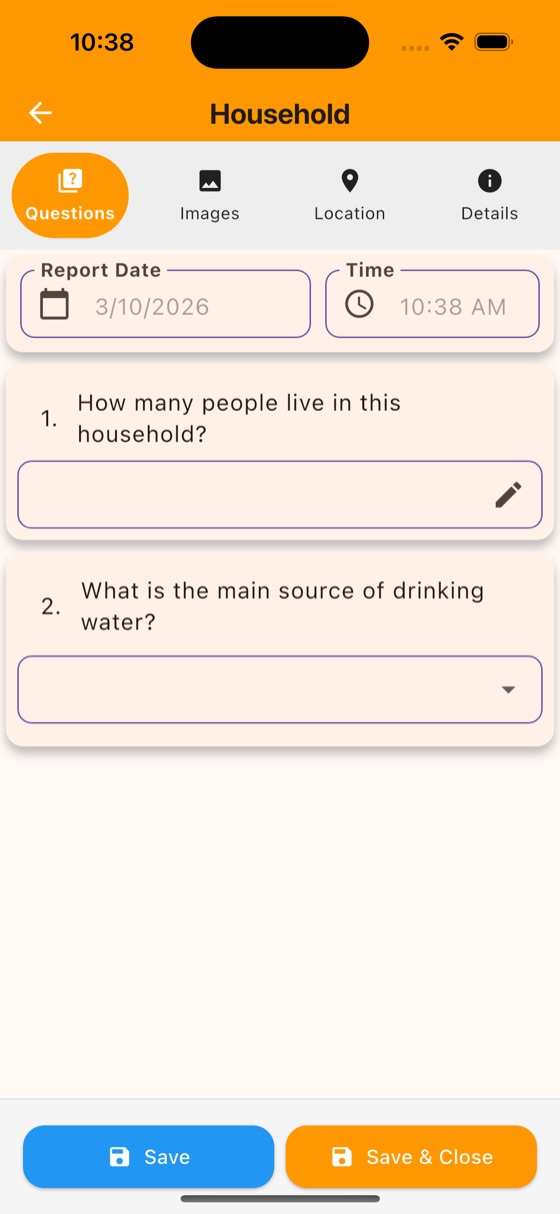
Survey questions on the mobile app
Analytics

Dashboards, statistics & AI summaries

Build dashboards of configurable charts, run correlation, box-plot and scatter analysis, and search across records.

CorrelationBox plotsScatterAI summariesSemantic search
Chart dashboard on the mobile app
Geography

Geography-aware

Every record sits in a full hierarchy and on the map, with bubble, pin and density views.

CountryState / ProvinceDistrictBlock / CityLocality ●
Offline-first

Works offline in the field

Record events on mobile with location, photos and audio — even with no signal.

Languages

In your community's languages

Present instruments and the interface in the languages your teams use.

Survey questions shown in English beside their Gujarati translation
Participatory

Participatory (PRA) toolkit

Run Transect Walks, Seasonal Calendars, Problem Trees, Venn Diagrams and more digitally — capturing community voice as structured, analysable data.

Transect WalkSeasonal CalendarProblem TreeInflow / OutflowVenn DiagramBrainstorm Board
Teams & ethics

Built for teams & ethics

Role-based access, built-in participant consent, and multi-language support — fit for real field conditions and research-ethics requirements.
User management screen with roles and permissions
How it works

Study design to reporting, in four steps

01
Setting the geographic scope on a map

Set up your study

In Survey Mode, create a project and its event types (survey forms); in Module Mode, a theme and its modules. Design your questions, and set the geographic scope.

02
Adding team members with roles

Assign your team

Add coordinators and members with the right roles and regions.

03
Collecting a record on mobile

Collect in the field

Field staff collect events (surveys) and module records on mobile — offline-capable — with location, photos, and audio.

04
Summary map with bubbles

Analyze & report

Explore maps and dashboards, run statistics, and generate AI-assisted summaries.

In practice

From the field to the report

Three illustrative scenarios of how teams use Empower.

11.05°N · 76.07°E
Livelihoods

Rural livelihood survey

A university team maps household income sources across districts, uses the Inflow/Outflow PRA tool, and visualizes economic patterns on density maps.

10.85°N · 76.27°E
Monitoring

NGO program monitoring

A development org tracks intervention events across wards, assigns coordinators by region, and reviews progress on a live dashboard.

09.93°N · 76.26°E
Participatory

PRA workshop digitization

A facilitator runs a Seasonal Calendar and Problem Tree with a village group in the app, producing structured outputs for a report.

Pilot

Bring Empower Community to your organization

Built and proven at Amrita — now available to research institutions, NGOs, government programs, and CSR teams across India and worldwide. Hosted for you and offline-capable in the field. Start with a free pilot that includes every feature.

Start with a free pilot

Register your organization, verify your email, and log in. You become its SysAdmin and can add your team straight away.

Free · 3 months

Everything in the app

  • Survey Mode and Module Mode
  • Web app and offline mobile collection
  • Roles, regions & team management
  • PRA field toolkit
  • Analytics, spatial maps & statistical analysis
  • AI summaries & semantic search
  • Data & chart export
  • Multiple languages

Pilot limits

  • 3 months, extendable on request
  • 1 project with up to 3 event types (survey forms)
  • Up to 500 submitted events (surveys)
  • 1 theme with up to 5 modules
  • Up to 1,000 module records
  • Up to 10 users

Need more? Send us a note from Help & feedback in the app and we'll work out the right setup with you.

The pilot gives you the whole app. Only the amount of data is limited, so you can run a real study and see how Empower Community fits your work. When the pilot ends, your data stays in place for you to view and export; adding new data needs an extension.
Questions

Frequently asked questions

Grouped by what you're here to do.

General
What is Empower Community?
Empower Community is a platform for structured, participatory community data collection and analysis. It pairs a mobile app for fieldwork with a web console for study design, team management, and analysis — helping NGOs and researchers move from raw field observations to research-grade insight.
Who builds and maintains it?
Empower is developed and maintained at Amrita Vishwa Vidyapeetham by the App Development team under Amrita WNA. To get in touch, email amritakripatech@gmail.com.
Is it free to use?
You can start with a free 3-month pilot that includes every feature of the app: 1 project with up to 3 event types (survey forms) and 500 submitted events (surveys), 1 theme with up to 5 modules and 1,000 records, and up to 10 users. To start one, register your organization. Need more? Send us a note from Help & feedback in the app.
Is there both a mobile app and a web version?
Yes. The mobile app is built for field collection (including offline use), and the web app is used for setting up studies, managing teams, and running analysis. Both work from the same project data.
What's the difference between Survey Mode and Module Mode?
Survey Mode (Projects → Event Types → Events, where an event type is a survey form and each event is one survey collected with it) is for structured, time-bound data collection — one-off surveys, baseline studies, and campaigns — with conditional and recurring question flows. Module Mode (Theme → Module → Records) uses a Digital Twin approach for continuous, longitudinal monitoring, modeling real-world entities and their one-to-many or self-referencing relationships. You can use either mode on its own, or both together.
What languages does it support?
Empower has built-in multi-language and translation support, so instruments and the interface can be presented in the languages your community uses. Currently available: English, Hindi, Malayalam, Tamil, Telugu, Kannada, Marathi, Bengali and Odia. More languages can always be added to the app.
For researchers & scholars
Can I use Empower for my thesis or study?
Yes — it's purpose-built for field research. You design your own instruments (event types or modules, and their questions), control the geographic scope, and own the resulting dataset.
Does it support participant consent?
Yes. A built-in consent step lets you record participant consent before collecting data, supporting research-ethics requirements.
Can I export data for Excel / SPSS / R?
Yes — Empower supports exporting data and charts from the app for external analysis in your preferred tools.
What question/answer types are supported?
Text, number, single and multiple choice, date, location (GPS), image, document, audio and video. In Module Mode, a question can also link to records in another module. Number questions marked as analytical feed the statistics and correlation tools.
Can I run participatory (PRA) exercises?
Yes. Empower digitizes Participatory Rural Appraisal tools — Transect Walk, Seasonal Calendar, Problem Tree, Inflow/Outflow (income–expenditure), Venn Diagram and Brainstorm Board — capturing community input as structured, analyzable data.
Who owns the data I collect?
You and your institution retain ownership of the data you collect. Empower stores it securely so your team can access and analyze it.
For NGOs & field teams
Can multiple field workers collect at once?
Yes. Under a project you add team members and assign them roles and regions, so many coordinators can collect in parallel.
What roles exist and what can they do?
Each organization has a SysAdmin (runs the organization and its accounts), Admins (create projects, users and places) and Coordinators (field users). Inside a project, people get a project role: Project Manager (sets up the event types and team), User Manager (manages the field team), Project Member (collects), Member Observer (collects and sees the whole project) or Project Observer (view and download only). In Module Mode, access is granted per place, theme and module. Everyone sees only what they are assigned to.
Does it work offline in remote areas?
Yes. The mobile app is offline-capable — data is stored locally on the device during collection and syncs when a connection is available.
Can I track work across many regions?
Yes. Every record sits in a full administrative hierarchy — Country → State/Province → District → City → Locality — and can be viewed on bubble, pin, and density maps.
Data, privacy & security
Where is my data stored?
The database runs on servers hosted by Amrita Vishwa Vidyapeetham, and photos, audio and files are kept in Amrita's own Amazon Web Services account. Only the Empower team manages these systems. See the privacy policy for details.
Is my data secure?
Access is protected by authenticated accounts and role-based permissions, and data is transmitted over encrypted (HTTPS) connections.
How is access controlled?
Through role-based permissions and project-scoped visibility — users only see the projects and data they're assigned to.
Can I delete a participant's data?
Yes — project administrators can remove records on request, supporting participants' right to withdraw.
Technical & setup
What do I need to run it?
A modern web browser for the web console, and the mobile app for field collection. Mobile builds target Android and iOS; the app also runs on the web and macOS.
How do I get an account?
If your organization already uses Empower, ask its administrator to create your account. To bring Empower to a new organization, register your organization: you become its SysAdmin and can add your team yourself.
Where do I get help or report a bug?
Inside the app, open Send feedback under Help & feedback in the menu to report a bug or ask a question; the team reads every note. The tutorials cover each task step by step. You can also email amritakripatech@gmail.com.

Ready to run your study on Empower Community?

Design instruments, collect in the field, and analyze — all in one place.